Universal TV Remote - Smart TV
Publisher Description
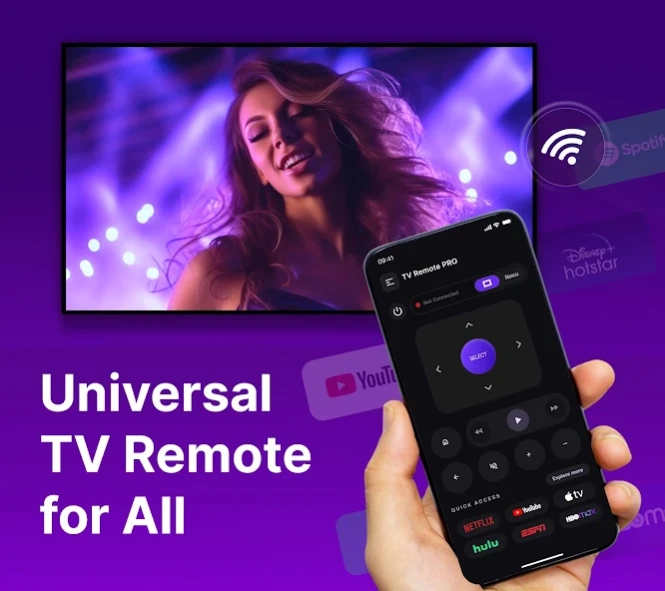


Control your TV with Universal TV Remote for all Smart TV
Lost your TV remote? Control your TV instantly with your phone using the Universal Remote Control App! 📺
This powerful TV remote control app turns your device into a smooth and reliable smart TV remote using a smooth WiFi TV remote connection.
No delays. No confusion. Just quick and easy control with the universal remote for TV experience.
⚡ Fast & Smooth TV Control Experience
Tired of slow and unresponsive remote apps?
This remote control app is built for speed and performance, giving you instant response and smooth navigation every time.
New Feature Alert:
The Universal TV Remote is now powered with Roku TV. You can now easily access Roku TV using this app.
Enjoy a seamless TV remote control experience designed for everyday use.
🌐 Quick WiFi Connection – No Setup Hassle
Connect your phone to your TV in seconds using a secure WiFi TV remote feature.
✔️ Auto-detect nearby devices
✔️ Fast pairing on same network
✔️ Stable and reliable connection
✔️ Access Roku TV Remote with all channels
Start using your smart TV remote without complicated steps.
🎮 Full Remote Features in One App
Control everything you need with this all-in-one remote for TV:
Power ON / OFF your TV
Adjust volume smoothly 🔉
Change channels and browse content 📺
Play, pause, forward, and rewind
Easy navigation with touchpad
Roku TV Remote
This TV remote control app replaces your physical remote completely.
🔍 Smart Auto-Detect Technology
No manual setup required!
The app automatically scans and detects supported devices on your WiFi network.
With this intelligent system, your remote control app is ready to use in seconds.
🎯 Designed for Simplicity & Speed
Unlike many apps that feel slow or complicated, this smart TV remote focuses on:
✔️ Clean and simple interface ⚙️
✔️ Fast response time ⚡
✔️ Smooth control without frustration
✔️ Lightweight and efficient performance
Control your TV easily with a better remote for TV experience.
🚀 Why Choose This TV Remote Control App?
✔️ Access Roku TV & Roku Remote
✔️ Powerful TV remote control in your pocket
✔️ Reliable WiFi TV remote connection
✔️ Works with a wide range of smart TVs
✔️ Easy-to-use remote control app for everyone
✔️ No need for multiple remotes
✔️ Quick setup and instant control
📥 Control Your TV Anytime, Anywhere
Whether you need a smart TV remote, a fast remote for TV, or a reliable TV remote control app, this app gives you everything in one place.
👉 Download now and enjoy smooth, fast, and easy TV control!
⚠️ Disclaimer
This app is an independent application and is not affiliated with or endorsed by any brand. All trademarks and brand names belong to their respective owners and are used for reference purposes only.
🔒 Privacy & Terms
Privacy Policy: https://londonboxai.com/web/unitvremote/privacy-policy
Terms: https://londonboxai.com/web/unitvremote/tandc
EULA: https://londonboxai.com/web/unitvremote/eula
About Universal TV Remote - Smart TV
The company that develops Universal TV Remote - Smart TV is ZenGtools - WiFi App | TV Remote | Software Update. The latest version released by its developer is 1.0 .
To install Universal TV Remote - Smart TV on your Android device, just click the green Continue To App button above to start the installation process. The app is listed on our website since 2026-04-03 and was downloaded 6 times. We have already checked if the download link is safe, however for your own protection we recommend that you scan the downloaded app with your antivirus. Your antivirus may detect the Universal TV Remote - Smart TV as malware as malware if the download link to com.appnextg.remotecontroller.universal.tv.remote.control.tvremote.alltvremote.airmirror.firetv is broken.
How to install Universal TV Remote - Smart TV on your Android device:
- Click on the Continue To App button on our website. This will redirect you to Google Play.
- Once the Universal TV Remote - Smart TV is shown in the Google Play listing of your Android device, you can start its download and installation. Tap on the Install button located below the search bar and to the right of the app icon.
- A pop-up window with the permissions required by Universal TV Remote - Smart TV will be shown. Click on Accept to continue the process.
- Universal TV Remote - Smart TV will be downloaded onto your device, displaying a progress. Once the download completes, the installation will start and you'll get a notification after the installation is finished.
